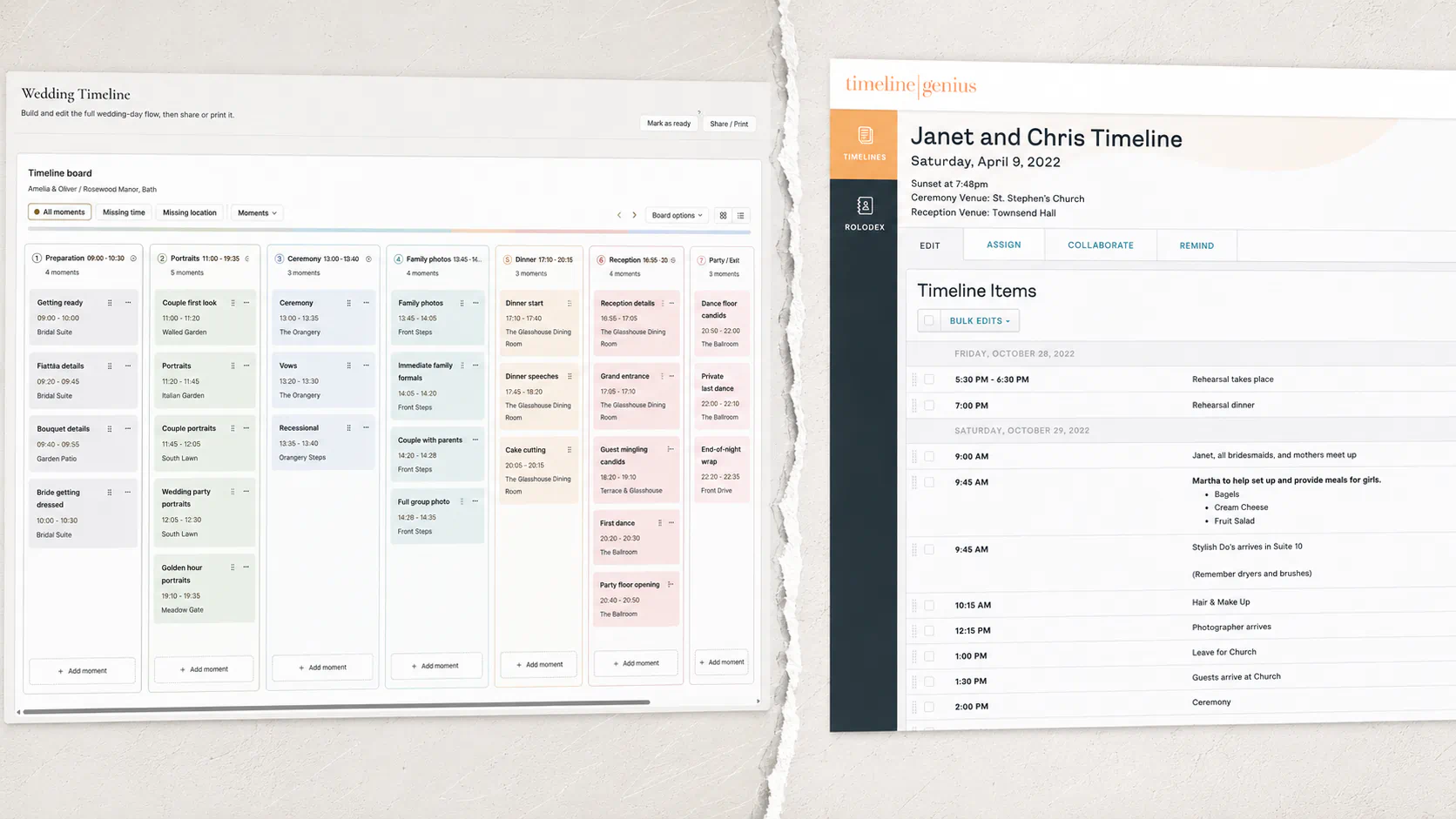
Wedding Desk will probably be compared with Timeline Genius, and that makes sense.
Both products put the wedding timeline near the centre. Both are trying to replace at least some of the documents, spreadsheets and messages that tend to accumulate around a wedding. Both also want the plan to remain useful once the actual day begins.
From a distance that makes them look alike, but they start from two quite different jobs. Timeline Genius is primarily built for wedding planners who need to coordinate the complete event. Wedding Desk is being built for photographers and videographers responsible for capturing it. Wedding Desk Go brings together the tools used to plan the wedding day, Solo adds the work before and after it, and Team later lets people work together.
And that shows up in almost every part of the product.
I am building Wedding Desk myself, so I am not a completely independent observer. Comparison articles written by the company being compared have a rather suspicious tendency to discover that their own product wins every category. I will try not to do that here.
Timeline Genius is an established product that has already been used at real weddings. Wedding Desk Go version 1.0 is available in beta, with Solo version 2.0 and Team version 3.0 to follow.
The shortest explanation
Timeline Genius helps a planner create and share the plan that everyone follows during the wedding.
Wedding Desk helps wedding shooters collect their project information and turn it into a practical plan for preparing and covering the wedding.
They overlap mainly on the timeline. Around it, they do quite different work.
Wedding Desk and Timeline Genius compared
This is how both products stand in August 2026. Timeline Genius changes regularly and Wedding Desk changes almost daily, so treat it as a snapshot. The Timeline Genius column comes from its own product, pricing and support pages.
| Area | Timeline Genius | Wedding Desk |
|---|---|---|
| Made for | Wedding planners and coordinators | Wedding photographers and videographers |
| Main job | Coordinate the whole wedding | Prepare and shoot the wedding |
| Wedding-day timeline | Yes | Yes |
| Templates and bulk time shifts | Yes | Yes |
| Shot list | No | Yes |
| Gear preparation | No | Yes |
| Reusable contacts and vendors | Yes | Yes |
| Working view during the wedding | Yes | Yes |
| Client questionnaires and intake | Yes | Yes |
| Checklists | Yes | Yes |
| Crew collaboration | Yes | Yes |
| Tailored plans per person | Yes | Yes |
| File and document library | Yes | No |
| Video-specific tools | No | No |
| Quotes and invoices | No | Yes |
| Contracts and payments | No | No |
| Price per month | $54.95, or $549.95 a year, or $194.95 for 5 events | $19 Go, $29 Solo, $59 Team |
Where Timeline Genius goes further
Timeline Genius currently goes further in event-wide coordination and in distributing different versions of the plan to everyone involved. That does not mean Wedding Desk has only a basic timeline.
Both products can turn questionnaire or intake answers into a starting timeline, reuse templates or earlier weddings and move many items at once. Wedding Desk can also generate shot-list suggestions from the intake, then connect accepted shots and each timeline moment directly to the wider shoot plan. Timeline Genius extends further into custom timeline types and tailored PDF versions for clients, vendors, venues and the wedding party.
Its collaboration system is also considerably more mature. Clients, vendors and venues can receive individual collaborator links, while the planner controls which items each person may view or edit. Wedding-party and custom-group schedules can be distributed as tailored PDFs. Paid plans include unlimited account members, and information can be marked as internal so it stays visible to the planning team but hidden from outside collaborators.
On the wedding day, its Execute View lets users mark timeline activities complete, make live edits, send text updates, see confirmation of receipt for Execute updates and keep private notes on individual timeline items. Wedding Desk already has its own On The Day view, but it would be misleading to present the current release as equally mature or equally proven.
Timeline Genius has also expanded beyond timelines. Its event checklists support templates, due dates, task grouping, assignments and collaboration. More recently, it added Genie, an AI assistant that can examine timelines and uploaded documents, identify conflicts and suggest adjustments. Genie itself is still in beta, but it is a real current feature rather than a future roadmap item.
For a wedding planner or coordinator who needs to control the complete event and communicate different versions of that plan to many people, Timeline Genius is currently the more complete coordination tool.
Which makes sense, because that is exactly the job it was built for.
Where Wedding Desk is different
Wedding Desk does not begin with the question, "How do I coordinate this entire wedding?"
It begins with, "What does the photo and video crew need in order to prepare this shoot and cover the day properly?"
That includes some of the same information a planner needs: times, locations, contacts and important moments. It also includes information needed specifically by the people carrying cameras, lenses, microphones, recorders and an unreasonable number of batteries.
The timeline therefore sits inside a broader shoot project. Client intake, notes, shot priorities, gear preparation, reusable contacts, wedding-specific vendors and delivery preparation are meant to stay connected to it. A must-have shot should not sit in a separate document. It should belong to the moment where it needs to happen. The same principle applies to gear, locations and day-of contacts.
That timeline is a full working tool: Wedding Desk can use intake answers to generate timeline and shot-list suggestions, reuse earlier weddings through saved templates and shift multiple times together. Those functions are just designed around what photographers and videographers need before and during coverage.
A must-have shot should not sit in a separate document. It should belong to the moment where it needs to happen.
Wedding Desk also shows what is ready and what still needs attention. That can include missing client information, an unfinished timeline, missing contacts, unchecked gear or delivery work that still needs attention.
Timeline Genius can store many of those details inside timeline items, text sections, files or checklists. Wedding Desk gives shots, gear, contacts, notes and delivery preparation their own clear place while keeping them connected to the wedding.
Wedding Desk also grows beyond Wedding Desk Go. Solo adds the work before and after the wedding, while Team later lets the people working on the wedding use the plan together.
Whether that approach ultimately works better will need to be tested with real users. More dedicated structure can be useful. It can also become a big pile of screens nobody asked to open. That balance is one of the main things I am still trying to get right.
The videographer question
Wedding Desk is being built for both wedding photographers and videographers. Videographers are not supposed to be an optional sentence added at the bottom of a photography product.
But the current version does not yet contain the dedicated video functions I eventually want it to have. There are no complete audio-planning templates, microphone assignments, recorder plans, camera-position diagrams or video-specific ingest and delivery tools yet. The basics are already there: projects, intake, timeline, shots, gear, contacts, notes and delivery preparation. Dedicated video tools will follow later. Wedding Desk says this explicitly on its current site.
Timeline Genius can include videographers as vendors, collaborators or assigned parties, and a planner can put video requirements into timeline items and checklists. But it is not presented as a dedicated tool for videographers either. Its main purpose remains event planning and coordination.
So someone looking specifically for detailed audio, multicamera and footage-management tools should not read this comparison and conclude that either product currently replaces a dedicated video-production system, at least for now.
Could the two products be used together?
Yes, and that may well be the most sensible setup.
A wedding planner could build and coordinate the master event timeline in Timeline Genius, with tailored versions for vendors and participants. The photographer or video crew could then use Wedding Desk for the coverage plan, shot priorities, gear, project notes and delivery preparation.
There would still be some overlap, and without a direct integration, probably some manual copying. But the tools would be serving different people on the same day: the planner makes the wedding happen, and the shooter has to be ready to capture it.
Which one is the better fit?
Timeline Genius makes more sense when your main responsibility is coordinating the entire event. Its clearest current advantages are broad event checklists, detailed control over what invited people can see or change, tailored timelines for different groups, branded PDFs, text updates and tools a planner can use during the wedding.
Wedding Desk makes more sense when your main responsibility is preparing to photograph or film the wedding. It can turn intake answers into timeline and shot-list suggestions, reuse saved templates from earlier weddings and shift multiple times together. It then connects the schedule to shots, camera and audio gear, vendors and contacts, notes and delivery preparation. All of that stays together in one place for the photographer or videographer.
There is also an important difference in risk.
Timeline Genius is a mature paid product that can be assessed as it exists today. Wedding Desk is still in development: important parts are unfinished and it needs to be tested at real weddings. Wedding Desk Go is version 1.0, Solo will be version 2.0 and Team will be version 3.0.
How I see it
I do not see Timeline Genius as the product Wedding Desk needs to defeat.
It is the closest established neighbour because both products depend on the timeline. But one is built outward from the planner's responsibility for the event, while the other is being built outward from the shooter's responsibility for capturing it.
There is overlap between those jobs, sometimes quite a lot. But it is not the same job.