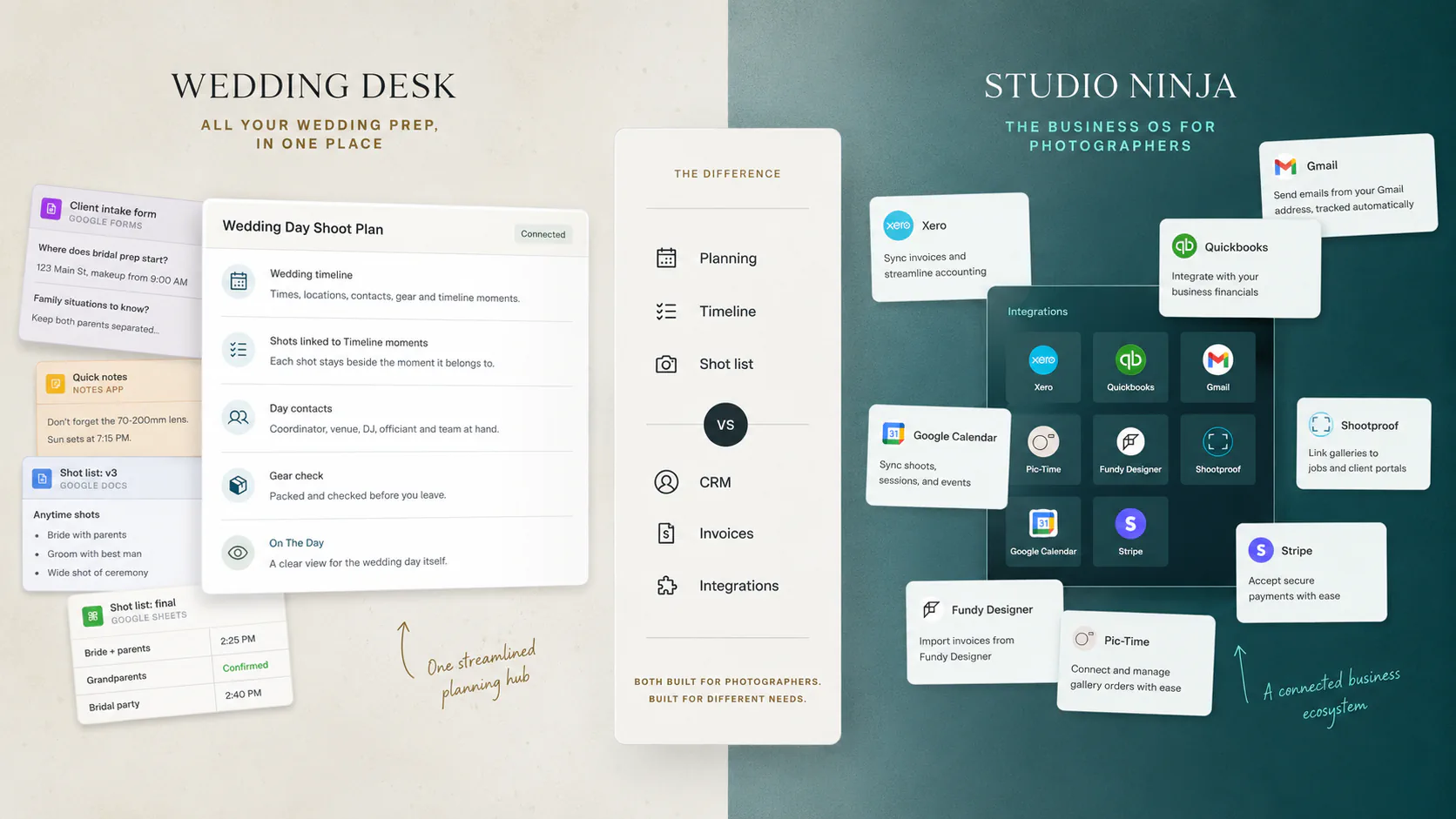
Studio Ninja kept turning up while I was working out what wedding photographers actually use to keep their work organised. So it was an obvious thing to compare Wedding Desk against. It was also a slightly awkward one, because these are not two versions of the same product.
Studio Ninja is a photography CRM. An enquiry comes in, becomes a booked job, the client gets emails, contracts, questionnaires and an invoice, you get paid, and the business keeps moving. It is good at that.
Wedding Desk starts after all of that. The Timeline, what needs to be shot, the Shot List hanging off the moments of the day, the gear, and then that same plan in your hand while the wedding is actually happening.
I built one of these two, so factor that in. The only version of this comparison worth writing is one where I say it plainly when Studio Ninja does something better. Anyone about to pay for either is better off understanding the difference than reading a pitch in disguise.
For context, Wedding Desk has three plans and they stack. Go covers the wedding-day planning. Solo is everything in Go plus the wider workflow around the wedding. Team is everything in Solo plus the crew. The pricing page has the full split.
The short version
Here is the simplest way to separate them. Studio Ninja runs the photography business around the job. Wedding Desk prepares and runs the wedding shoot itself.
I used the same comparison format in my earlier article, Wedding Desk vs Timeline Genius: Same Timeline, Different Job. That comparison is useful context because it shows the difference between an event-planning product and a shoot-planning product from another angle.
Wedding Desk and Studio Ninja compared
Studio Ninja details come from its own product and pricing pages, checked in August 2026.
| Area | Studio Ninja | Wedding Desk |
|---|---|---|
| Main purpose | Run the photography business | Plan and run the wedding shoot |
| Built only for weddings | No, it supports every photography job type | Yes |
| Lead management | Yes | No |
| Website enquiry forms | Yes | No |
| Online booking | Yes | No |
| Quotes | Yes | Yes |
| Contracts and e-signing | Yes | No |
| Invoicing | Yes | Yes |
| Taking payments | Yes | No |
| Automated emails and workflows | Yes | No |
| Client questionnaires and intake | Yes | Yes |
| Client portal | Yes | One read-only share link |
| Wedding-day Timeline | No | Yes |
| Shot List linked to the Timeline | No | Yes |
| Gear preparation | No | Yes |
| Working view during the wedding | No | Yes |
| Calendar | Yes | Yes |
| Accounting and gallery integrations | Xero, QuickBooks, Stripe, Pic-Time, ShootProof | No |
| Crew collaboration | Yes, aimed at business administration | Yes |
| Mobile app | Yes, iOS and Android | Planned |
| Monthly price | $16 Starter, $27 Pro, $40 Master | $19 Go, $29 Solo, $59 Team |
Studio Ninja runs the business side properly
If enquiries and bookings were my main problem, I would not pick Wedding Desk.
A lead arrives through a contact form, enters a workflow, gets automatic emails, becomes a job, receives a quote and a contract, gets signed electronically, collects a questionnaire and takes payment through the client's own portal. Payment reminders chase people without you.
Wedding Desk does not try to rebuild any of that. It has a pricing calculator, packages, quotes and invoices, and that is where I stopped on purpose. No lead pipeline, no e-signing, no payment collection and no online booking.
The integrations are the other gap. Studio Ninja connects with tools such as Xero, QuickBooks, Stripe, Gmail, Google Calendar, Pic-Time and ShootProof. Wedding Desk has none of those. Studio Ninja also has iOS and Android apps today, while the Wedding Desk app is still on the way, and a seven-day trial that does not ask for a card.
If that list is what your week actually looks like, this is not a close call.
Where Wedding Desk goes further
The gap Wedding Desk fills sits between this wedding is booked and I am standing at that wedding shooting it.
The Timeline carries the working shape of the day: prep, travel, ceremony and the awkward gap before dinner. Shots sit with the moment they belong to. Gear gets prepared against it. A starter template hands you a day to edit instead of a blank page.
Then On The Day cuts all of that back to what matters while the wedding is moving: what is happening, what is next, which shots still need doing and what is attached to this part of the day.
Studio Ninja runs the business around the wedding. Wedding Desk prepares the wedding day itself.
That is a very different job from telling a client that their invoice is late.
Questionnaires overlap, but not for the same reason
Studio Ninja has reusable questionnaire templates, sends them by hand or as a workflow step, and brings the answers back into the job through the client portal. That is solid CRM automation.
I added intake for a different reason. I wanted the answers to turn into the plan instead of sitting in a completed form. The ceremony time goes into the Timeline. Requested family groups go into the Shot List. Locations attach to the part of the day where they are useful.
I am still working out how much to ask, because wedding questionnaires get enormous fast and more answers are not the same as more useful answers. Studio Ninja gives you far more freedom to build and automate them. Wedding Desk is trying to be stubborn about what actually needs to survive into the shoot.
Studio Ninja is also broader
Wedding Desk is narrow on purpose. A family photographer, a school photographer or a studio running mini sessions would find much of it unnecessary. Studio Ninja handles all of those, and its online booking is genuinely useful for repeatable sessions.
Being narrow lets me assume things Studio Ninja cannot. There is a ceremony. There are several locations and a handful of people who matter more than everyone else. Some things happen exactly once and cannot be moved to Tuesday afternoon.
Useful if you shoot weddings. Irritating if you do not.
So which one
You could run both, and I do not think that is a cop-out. Studio Ninja takes the enquiry through to the paid invoice. Wedding Desk takes the booked wedding through to the end of the day. You would retype a name and a date in two places, and whether that is annoying enough to matter is your call.
Price will not decide it either. Paying $27 for automated contracts and paying $29 for wedding planning are not the same purchase, and the few dollars between them is the least interesting part of the choice.
Pick by whichever part of the job is currently ruining your week. If it is the enquiries and the chasing of invoices, Studio Ninja. If it is the pile of PDFs, documents, screenshots and half-finished shot lists you drag into every wedding, that is the one I built.