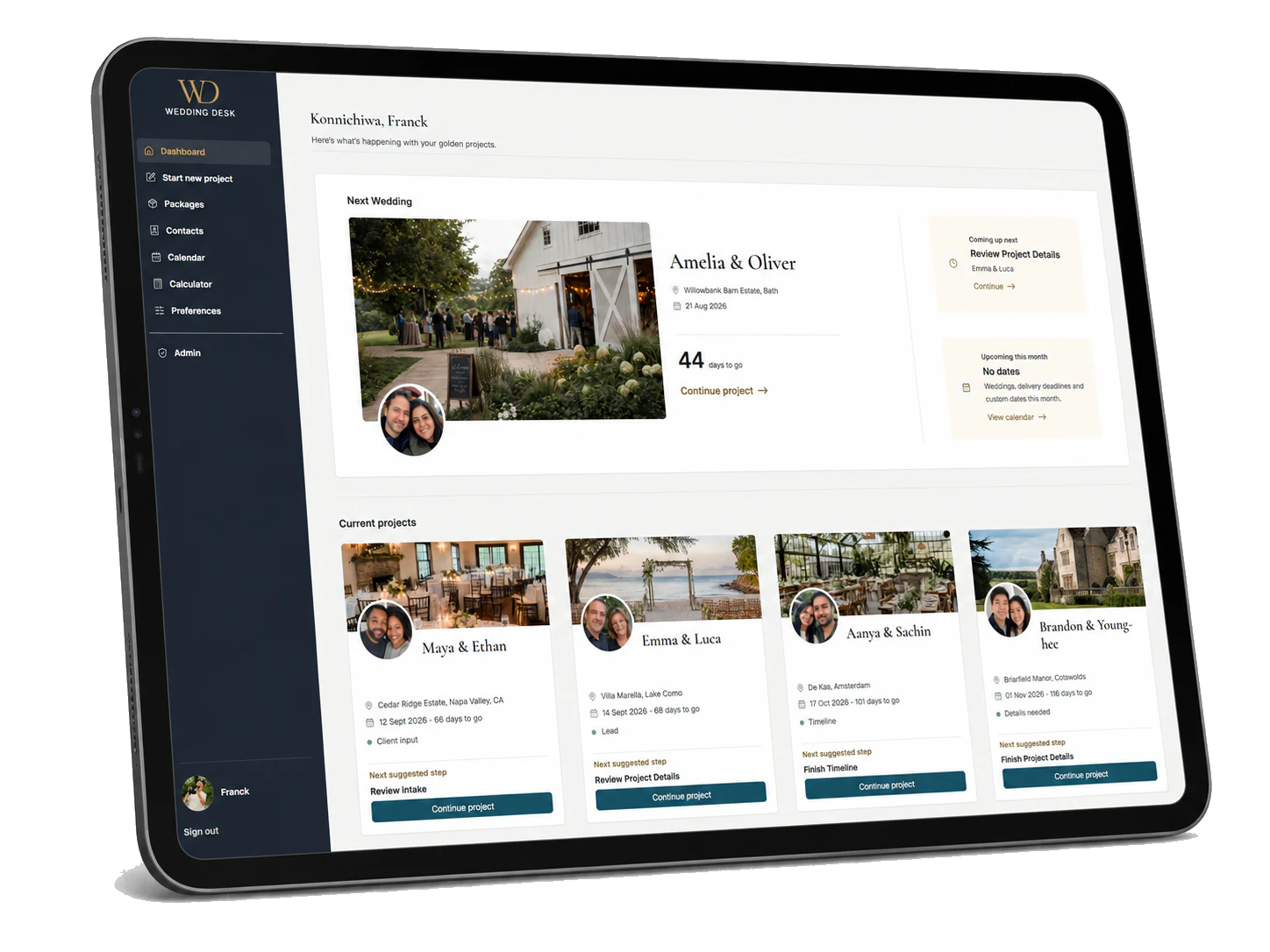
After months of work, I finally have something to show.
Wedding Desk is now online in alpha. It is nowhere near finished, important parts are still incomplete and some things change almost daily, but it no longer exists only on my local development server, and that already feels like a big deal.
I'm Franck, and I normally divide my time between music, recording, video, software and whatever project has managed to pull me in too far. Over the past few months, that project has been Wedding Desk.
What started as a fairly small idea has grown into a many-headed monster that I am now trying to tame one part at a time. Every new feature seems to uncover three other things that also need to work. As a result, almost every free minute and a large part of my working time have gone into building it.
That is also why things have been quieter on my other sites and Youtube. I did not stop working. I just disappeared into this instead.
What Wedding Desk is
Wedding Desk is a workflow and planning app for photographers and videographers who shoot weddings.
A wedding shoot involves much more preparation than people outside the industry may realise. There are questionnaires, locations, timelines, shot lists, family groups, equipment, vendors, notes and all kinds of small details that become very important once the day is moving.
That information often ends up spread across emails, documents, spreadsheets, screenshots and notes apps. Wedding Desk is my attempt to bring it together and turn it into one practical working plan.
The app covers preparation before the wedding, the Timeline itself, shot and gear planning, contacts and eventually the plan you use during the wedding day. It is deliberately a niche product. It is not meant for every photographer or every kind of production. It is being built specifically around wedding shoots.
The difficult part
The hardest part is deciding how many features should be visible at the same time. Adding them is the easy bit.
Wedding photographers and videographers deal with a lot of information, so the app needs enough structure to be really useful. But opening a project should not immediately make someone think: what on earth am I looking at?
If I leave too much out, the tool gets too limited. If I put everything on screen, people are worn out before they have even started.
Opening a project should not immediately make someone think: what on earth am I looking at?
That balance causes me a lot of headaches. The app needs to contain timelines, client information, shots, gear, contacts and delivery preparation, but it also needs to feel calm when someone opens it.
The same information also needs to work differently depending on the moment. During preparation, someone may want editing tools and detailed settings. On the wedding day, most of that should disappear. At that point, the important questions are much simpler: where do I need to be, what is happening now, what comes next and what must not be missed?
Opening access carefully
I could continue building privately for another six months and still find reasons not to show it.
So I may invite a very small number of wedding photographers and videographers to try it and give honest feedback. Broader access comes later, when most of the product is working well enough for more people to actually use.
The preparation side is already becoming usable, but On The Day is a different challenge. That part needs to be fast and dependable on phones and tablets. It may eventually be used by one person, an assistant or a team, with changes appearing in real time.
I do not want to open that widely before I am reasonably sure it works properly.
Test users should therefore keep their usual documents or apps beside Wedding Desk during a real wedding. Wedding Desk should not yet be the only place where critical information exists. There will be missing pieces and problems, and finding them is exactly what this small test phase is for.
At the same time, the On The Day view eventually needs to be tested at real weddings. There is only so much you can learn while sitting behind a desk and pretending the ceremony has just moved fifteen minutes.
What will appear on this blog
This blog will contain a mixture of development updates and practical product documentation.
Some posts will be more personal: what I am building, what went wrong, what changed and why certain decisions turned out to be more complicated than expected.
Other posts will be straightforward explanations of how specific parts of Wedding Desk work. Timelines, shot lists, gear preparation, project setup, client input, On The Day and other individual features will each get their own deeper articles, tutorials and manuals.
The Wedding Desk Help Center already contains the first explanations. It is also very much a work in progress. It will gradually be expanded with screenshots, step-by-step guides and YouTube videos for the different parts of the app.
The site will keep growing, but at a manageable pace. I expect it will still take several months before I can honestly say that Wedding Desk is ready to be relied on throughout an actual wedding day.
But at least it is public now.
You can see the project at weddingdesk.app.
Should you be a wedding photographer or videographer and testing an unfinished product sounds strangely appealing, send me a message. I am looking for a small group of people who are willing to use it, question it and tell me where it fails.
As always, thanks for reading.