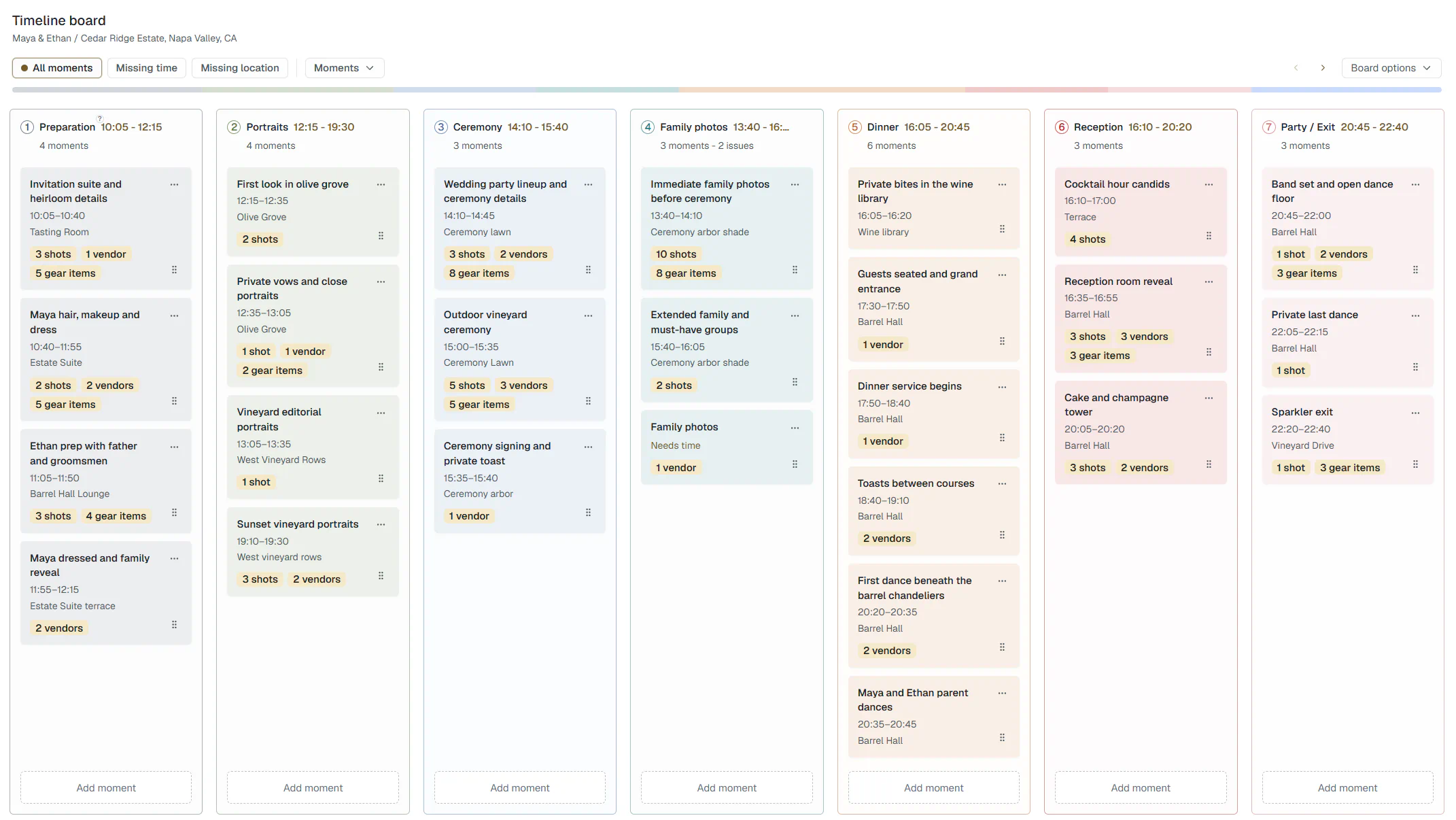
The Timeline, Shot List, Gear List and Contacts page in Wedding Desk have worked together for quite a while. Shots, vendors and gear could already be linked to the moments where they would be used.
The problem was not the connection itself. It was how much work it took to manage those details from the Timeline. You could see that a ceremony had linked shots or vendors, but changing them too often meant leaving the moment and working through a separate page.
That is what I have now improved. A Timeline moment can be opened and edited directly on the board, with its timing, location, notes, shots, vendors and gear close by.
You can still prepare each part on its own page, without rushing through one enormous form. Build the Shot List when you want to think about coverage. Prepare your gear separately. Add the important people and their contact details at your own pace.
Then, when you are working on the Timeline, you can open Family photos and manage its linked shots, vendors and gear without turning it into a completely different editing screen. Open the Ceremony and you can do the same there.
The information was already linked. The difference is that those links are now much easier to review and change while you are building the day.
Everything stays inside the moment you are working on
One thing I really wanted to avoid was turning the Timeline into another endless edit screen.
When you open a moment, you only see what belongs to it. You can review its vendors, switch the vendor linked to a shot or add another one without opening a separate edit page. The same goes for gear. You are not scrolling past every camera and lens you own to find the one you meant.
And if something ends up on the wrong shot, you can move it to another shot within the same moment, or unlink it, without leaving the page. That changes only that one shot. The contact or the gear item stays in the project and stays on the moment.
Small to describe, but it changes how the work feels. Everything you need for that part of the day is right there, and nothing else is in the way.
One plan, shown in different ways
The Timeline can be viewed as a board while you build the day, or chronologically when you want to read it from start to finish. Both views show the same plan.
There is no second Timeline to maintain and no separate version that slowly goes out of date. You can organise the day visually, then switch to the chronological overview without rebuilding anything.
Later, that same plan continues into On The Day. The preparation does not end in a PDF, printout or screenshot that immediately becomes another thing to manage. The Timeline, shots, contacts and gear move directly into the mobile or tablet view used during the wedding.
You prepare the plan once, then use that same plan throughout the wedding day.
Less searching. Less remembering.
This is the problem I have been trying to solve from the beginning.
Wedding photographers and videographers often prepare a wedding across several documents, apps and notes. The timeline in one place, the shot list somewhere else, contacts in a phone, the gear list either in Notes or in someone's head. Even when all of it is prepared, the wedding shooter still has to connect everything while working.
Wedding Desk already kept those parts linked. The improvement is that you can now work with more of those details from the Timeline itself. During preparation you can still work calmly on each part, then open a moment and adjust its shots, vendors or gear without breaking your flow.
Built from photography, expanding for video
Wedding Desk is still more developed around photography. Shot planning and family photos are the obvious examples.
The same plan is also useful for videographers. A ceremony has audio equipment, camera coverage, important contacts and footage that cannot be missed. Speeches need recorders, sound and clear responsibilities. Different requirements, same wedding day.
The video tools will become more specific as I build them. I do not want videographers to have to use a separate set of pages beside the photography plan. Photo and video should stay in the same wedding plan, with the right information for the person using it.
This might already be enough
While improving how these connections are edited from the Timeline, I started wondering whether these tools should also be available without all the additional work included in Solo.
A Timeline, Shot List, Gear List, Contacts and On The Day view already replace a large part of what many wedding photographers currently do with printed sheets, documents and scattered notes. Some photographers and videographers do not need Wedding Desk to handle everything from the first client questions through delivery. They already have a CRM they are happy with. What they are missing is a better way to prepare and run the wedding itself.
For them, this may already be the product. Prepare the shots, gear and people. Manage them from the Timeline. Use that same plan on the wedding day.
That next step is already well underway. The intake can already help prepare parts of the plan before you start, sometimes together with the couple. You can read more about that in my previous post, Turning the Intake Into a Plan You Can Actually Use.
That is why Wedding Desk Go brings the Timeline, Shot List, Gear List and On The Day view together. Wedding Desk Solo will later add the work before and after the wedding.
For now, the main change is simpler. The Timeline already held the plan together, but it is now much easier to edit that plan without leaving the moment you are working on.